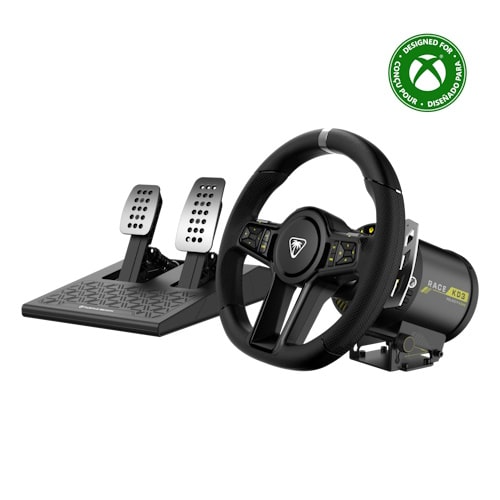
VelocityOne Race KD3 Racing Wheel & Pedals Review
Over the past few weeks, I’ve been reviewing one of Turtle Beach’s premier racing wheel setups: the VelocityOne Race KD3 Racing Wheel & Pedals. This is a near-complete sim racing wheel & pedal system for both Xbox and PC. I say near-complete, because it does not include a separate shifter or a clutch pedal.
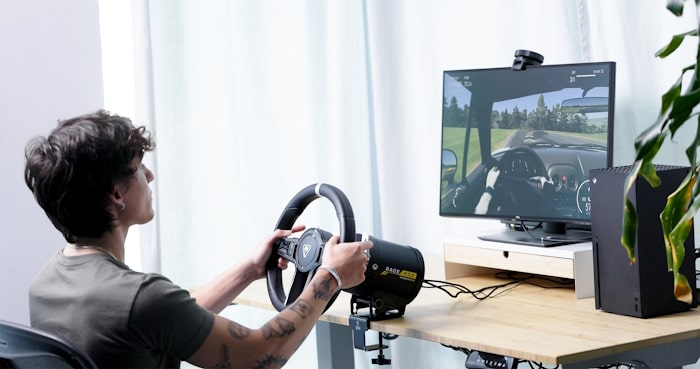
For my review, I initially started by using a wooden TV tray as a stand with the included clamp, but this was not nearly adequate enough. So I ordered a XRhinorth Racing Wheel Stand from Amazon, and it made all the difference in the world. I did all my reviewing on the Xbox Series X. My review started with the base firmware, but then – while testing – was upgraded to firmware 1.12. Unfortunately, the update’s patch notes have not been made available.
Force Feedback Feels Great
The wheel feels great and is quite a nice size. It features full rotation capabilities and a direct-drive motor that provides 3.2Nm of force feedback so you can really get a feel for the road. In terms of premium racing wheels, this amount of force feedback is about middle-of-the-road, however, in my experience with it, I really can’t imagine having more force feedback would be necessary. I think Turtle Beach found a great balance.
The wheel face features a D-Pad, A/B/X/Y buttons, and RT/LT/RSB/LSB buttons – these are all designed to function much like the controller counterparts. The wheel face also includes E1 & E2 dials. The E1 dial is customizable while the E2 dial is used to access the Race Management Display.
At this time, EA Sports F1 25 is the only Xbox Series X game that supports the RMD/telemetry on this gaming wheel. Since I didn’t own a copy, I couldn’t test out the display.
Design Choices
What is missing from the wheel face is the Xbox button, Menu button, View button and Share button. This was frustrating design choice. Almost every game uses the Menu & View buttons for at least some function – whether it’s to pause the game, view maps, or change car view. In Forza Horizon games, it’s also used to start races. These buttons are found on the right side of the drive motor. You have to awkwardly reach around the wheel and feel for the buttons, just hoping you click the right one.
Turtle Beach has told us that the reason for this was to avoid accidentally pushing these buttons while racing. I’ve used other racing wheels before where these buttons were on the wheel face, and it hasn’t been a problem before. With that said, Turtle Beach recommends customizing the E1 dial to perform these Menu or View button functions.

The aluminum pedals are quite stunning. The pedal tension can be easily adjusted without having to remove anything; you just twist a collar on the spring. The pedal positioning is definitely reminiscent of an actual car, but it isn’t necessarily ideal for racing at home. Even with the stand, the pedals just seemed too awkward to press down. I wish they were positioned 30 or so degrees more horizontal.
It’s worth noting that the VelocityOne Race KD3 Racing Wheel & Pedals USB cable that connects to the Xbox Series X is 8 feet long. For gamers with larger living rooms – such as myself – this can pose as a challenge. However, since they’re standard USB A to C cables, it is possible to purchase a longer one for your needs. The included power cord that’s included isn’t very long either, so an extension cord might be required, depending on your set-up.
Game Compatibility
I tested out a whole assortment of games for the VelocityOne Race KD3 Racing Wheel & Pedals, all of which appear in their handy Game Compatibility Guide.
EA Sports games would not automatically detect the VelocityOne Race KD3 Racing Wheel & Pedals. This included Grid Legends, EA WRC, and FI 24. After getting to the settings menu by using a controller, I could manually update the controls to detect the wheel/pedal functions. Despite this the steering still didn’t work properly. In one case, it would constantly pull my car in one direction. These games either had no in-game calibration or the in-game calibration didn’t work. Needless to say, I was not able to properly test these games out. I also had some wonky steering controls in Expeditions: A Mudrunner Game. The turning had an incredibly slow responsiveness. Again, it seemed like a calibration issue, but there was no in-game calibration options.
Turtle Beach did let us know that with some legacy titles, the steering wheel/pedals should work when everything is manually set up. However, in my experience, this wasn’t always the case.
Forza Motorsport, Project Cars 3 & Dirt 5
Of the games I tested, the best performing games were Forza Motorsport, Project Cars 3, and Dirt 5. All three of them worked with very little adjustments in the settings menus.
My favourite game tested was Dirt 5. It worked brilliantly and steered great most of the time. However, on occasion, under certain driving conditions, I would run into a steering issue where it felt like the steering wheel would get confused, causing my vehicle to swerve back and forth. This same issue popped up when I played both Forza Horizon 4 and 5. However, this might have been due to in-game settings I had toggled on. The recommendation from Turtle Beach: turn off steering assists.
It seems to me that simulation games work the best for this steering wheel. Arcade racing games that don’t utilize too many face buttons seem to work fine as well. But some older titles might have some compatibility challenges. And games that require using face buttons (think: Hot Wheels: Unleashed, Need for Speed games, Crew 2) might be a bit awkward to play.
Work in Progress
The VelocityOne Race KD3 Racing Wheel & Pedals is a work in progress. During my game tests, the gaming wheel was simply not detected/supported by some older games, particularly EA Sports titles, or didn’t perform very well. However, in games where the wheel/pedals were detected immediately, everything worked as intended – assuming steering assists are disabled. Only one Xbox Series X game supports the wheel’s telemetry display – hopefully this is quickly rectified with updates. The placement of the Xbox Menu, View & Share buttons is not ideal and can be a bit awkward. When the wheel works, it works well. It feels great and provides some awesome force feedback without feeling overwhelming. If you’re looking for a premium racing set-up, then definitely give the VelocityOne Race KD3 Racing Wheel & Pedals a consideration
***VelocityOne Race KD3 Racing Wheel & Pedals provided by the publisher.***
The Good
- Great feel and aesthetic.
- Solid force feedback.
- Easy to set-up.
The Bad
- Awkward placement of critical controller buttons.
- Control issues.
- Some game compatibility issues.