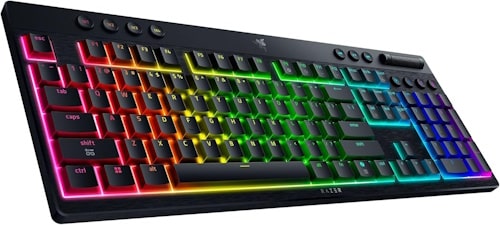
Razer Blackwidow V4 Low-Profile Hyperspeed Keyboard Review
Razer has released an updated version of their Blackwidow keyboard line with the Blackwidow V4 Low-Profile Hyperspeed keyboard. Unlike the eSports focused Huntsman line, the Blackwidow line is considered their Immersive line with a heavier focus on control, customization, and Chroma.
The version I opted for was the full-size, as I appreciate having the right hand number pad for all my intense calculating.

It’s clear just how passionate Razer is with their line-up of accessories. Before they shipped the Blackwidow V4, they gave me a one-on-one Zoom call presentation, showing me all the incredible features they’ve brought to this new keyboard. They wanted me to get the most out of this keyboard, and it was absolutely appreciated.
Beautiful Finish
The Blackwidow V4 Low-Profile Hyperspeed keyboard is an impressive looking device. The keycaps are Doubleshot PBT with an aluminum alloy top case. The keyboard has a decent amount of heft to it, yet doesn’t take up a lot of real estate on your desk. The added heft ensures you’re not pushing your keyboard around when you’re furiously typing away, trying to finish that review by the due date.
As the name suggests, the keyboard is also low-profile. The height of the keyboard is incredibly small, no taller than a penny. However, the 2-level kickstands can be adjusted to if you prefer a more angled keyboard.
The keys have three different switch options, and you’ll need to pick which one is ideal for you when you order it. For those that like each keystroke to sound extra clicky, you’ll choose the green switches. If you prefer keeping things quiet, the yellow switch is the silent option. For me, I chose the middle ground orange option, which provides a little bit of click, but not too much. My kids were annoyed I didn’t choose the clickier green option, but they also don’t have to write 900+ word reviews each week. The switches are engineered to last up to 80 million keystrokes. I’ll try and remember to update this review in a couple decades once I get around the 80 million keystroke mark.
Light Show
Where the Blackwidow V4 literally shines is the Razer Chroma RGB lighting. The per-key backlight provides an incredible amount of illumination, and it’s fully customizable. Using the Chroma app, you can utilize a variety of different Chroma Effects, allowing the colours to dance around in various ways. Starlight turns your keyboard into a twinkling starry night show, Reactive lights up the keys as you type, Ripple sends a colourful shockwave from the key you press. Colours can be adjusted too with near endless options.

Wireless Capabilities
The keyboard is wireless too. Unfortunately, my dated computer doesn’t have Bluetooth capabilities, so I’ll have to take Razer’s word on this. The battery life can last up to 980 hours. The keyboard includes a neat way of assessing how much battery life is back, with the quick click of the battery button, you’ll see one of the number keys light up, which corresponds to how much percentage battery life is left. Clever! For my purposes, I used the included USB C to USB A cord.

Added Feature Buttons
The Blackwidow V4 has an assortment of other handy features worth mentioning. The keyboard includes 4 customizable Macro keys. Don’t ask me how they work – despite my best efforts, I couldn’t figure out how to set them.
Additionally, the keyboard includes 3 dedicated media buttons and a clickable multi-function roller, perfect for adjusting sound and changing tracks while listening to music on your PC.
A wild addition is the inclusion of not one, but two, specially dedicated AI buttons. One specifically for Microsoft Co-Pilot and one for ChatGPT. Love it or hate it, AI is hear to stay, and companies like Razer are capitalizing by including it in every possible way. I can’t imagine I’d have much need for AI dedicated buttons, but other users might feel differently.
Synapse
One of the features, and limitations, of the Blackwidow V4 is the Razer Synapse app. In my experience, the keyboard would not function properly unless the Synapse app was running in the background. This, of course, adds yet another background app for users to deal with. I’ve had situations where the app wasn’t working properly, and the keyboard would become unresponsive. It’s a shame the keyboard is so tied to the app.
There are some benefits to the Synapse app, such as the ability to customize the various lighting effects, colours, and brightness for the keyboard. Additional settings to tweak include a Gaming Mode and Keyswitch Optimization.
The Razer Blackwidow V4 Low-Profile Hyperspeed Keyboard is a brilliantly designed keyboard and a worthy addition to a PC. The Blackwidow V4 is a perfect all-around accessory that’ll allow you to balance the need for gaming and for writing. The colours and various effects can be a lot of fun. I’m not a huge fan of the Synapse app, and found it wasn’t as stable as I needed it to be. If the Synapse app fails, the keyboard won’t work properly. The keyboard includes a variety of added functions, including useful media controls. The curious addition of two separate AI buttons is puzzling, but there very well could be a demand for it. The ability to pick between three different switch options should be a huge selling point. If you’re looking for a premium keyboard, the Blackwidow V4 should be a consideration.
***Razer Blackwidow V4 Low-Profile Hyperspeed Keyboard provided by Razer for review.***
The Good
- Many colour & effects options
- Beautifully designed
- Wireless with a long battery life
The Bad
- Synapse App
- Two dedicated AI buttons seems a bit overkill