Razer Viper V4 Pro Review
There’s no denying Razer consistently knocks it out of the park with their gaming mice. The DeathAdder, Cobra, and Mamba have all received high scores from us over the years. So it’s no surprise that Razer’s latest mouse, the Viper V4 Pro, performs just as impressively. It’s a competitive gaming mouse geared for folks who demand speed, precision, and consistency. It builds on the popular Viper V3 Pro, keeping that shape so many pros love while making it a tad lighter, a smidge faster, and a little more reliable.
First impressions matter, and right out of the box, this one delivers. Granted, it’s not flashy. There’s no RGB lighting or extra switches to fuss with. The design is fairly simple, but under the hood, it really excels.
Feather-Light Precision
At just 49 grams, the Viper V4 Pro is ridiculously light. From the moment you pick it up, it’s clear this mouse is built for quick, precise movements. Nothing about it feels clunky or cumbersome. The swipes are smooth, and fast flicks feel effortless. I usually prefer a slightly wider base, but the Viper V4 Pro’s shape works well for a variety of grips. Razer has also balanced the weight perfectly, so it doesn’t feel like one side is heavier than the other. Long sessions are certainly comfortable.
The switches feel great, and they’ve received an upgrade over the Viper V3. The V4 Pro uses Gen-4 optical mouse switches, which actuate using light instead of metal contacts. That means you don’t get the slight delays or double-click issues that mechanical switches can sometimes have. According to Razer, the Gen-4 switches are 12% lighter to press and rated for 100 million clicks, so this mouse can take a beating and keep going for years.

Razer wasn’t exaggerating. Every click feels sharp, tactile, and responsive. It’s clicky, yet it is a perfect mouse for high-pressure moments in competitive games or really any shooter. I didn’t experience a single misclick, and the clicks are seriously satisfying.
The scroll wheel also got a little upgrade. Old school mechanical wheels can wear down over time, to the point where you can get inconsistent input or ghost scrolls. The V4 Pro’s optical scroll wheel seems to avoid those problems entirely. This wheel delivers reliable and precise scrolling. Weapon swaps, inventory management, or zooming in games feel consistent every time. The wheel did exactly what it should, and that is really all I could ever ask for.
Seamless Wireless Power
Wireless performance is another area where the V4 Pro shines. It uses Razer HyperSpeed Wireless Gen-2, which delivers an impressively low-latency connection. Razer claims a 0.204 ms response time and up to 2.5× lower motion latency compared to other wireless mice. In real-world use, the mouse feels incredibly fast and precise. I’ve used plenty of wired mice over the years, and honestly, I didn’t notice a difference between them and this wireless setup. It’s that responsive.
I’ll admit, I’m a bit torn on the dongle. Sure, it’s neat and definitely fancier than your standard USB dongle. The hemisphere design keeps it stable so it doesn’t tip over, and the wireless signal is strong. On larger desks or setups with plenty of space, it works exactly as advertised. On a smaller desk, though, it can feel a bit bulky and get in the way, so that’s something to keep in mind. For standard PC gaming setups or bigger desks, the dongle makes wireless performance completely reliable, but in tight spaces, it might be a little tricky to manage.
The V4 Pro is capable of true 8000 Hz polling in both wired and wireless modes. This means the mouse updates its position frequently, so every movement you make translates instantly on-screen. The mouse also has a feature through Razer Synapse that automatically switches polling rates when you’re not gaming, which saves battery without reducing performance when you need it. Synapse Web also allows you to tweak DPI, button mapping, and other settings.
Battery life is solid, even with all the high-speed features enabled. You can get up to 180 hours at 1000 Hz or about 45 hours at 8000 Hz, which is more than enough for long gaming sessions without worrying about running out of power. I’ve only had to charge the mouse once in the past two weeks.
Gigantus Advantage
I reviewed it on a variety of surfaces but spent most of my time with the mouse on Razer’s Gigantus V2 Pro mouse mat. Like the mouse, the mat is all about giving you precise control over your movements. It’s not a one-size-fits-all solution, though. Before buying, you need to consider your playstyle. Each version features a uniquely engineered surface with its own thread and weave pattern, creating a specific friction profile that ranges from controlled to ultra-fast glide. Beneath the surface, Razer’s GlideCore foam comes in three firmness levels, each tuned to complement its speed category. The mat emphasizes consistency, and at around $50, the Gigantus V2 Pro is one of the most reliable mouse mats you can get.
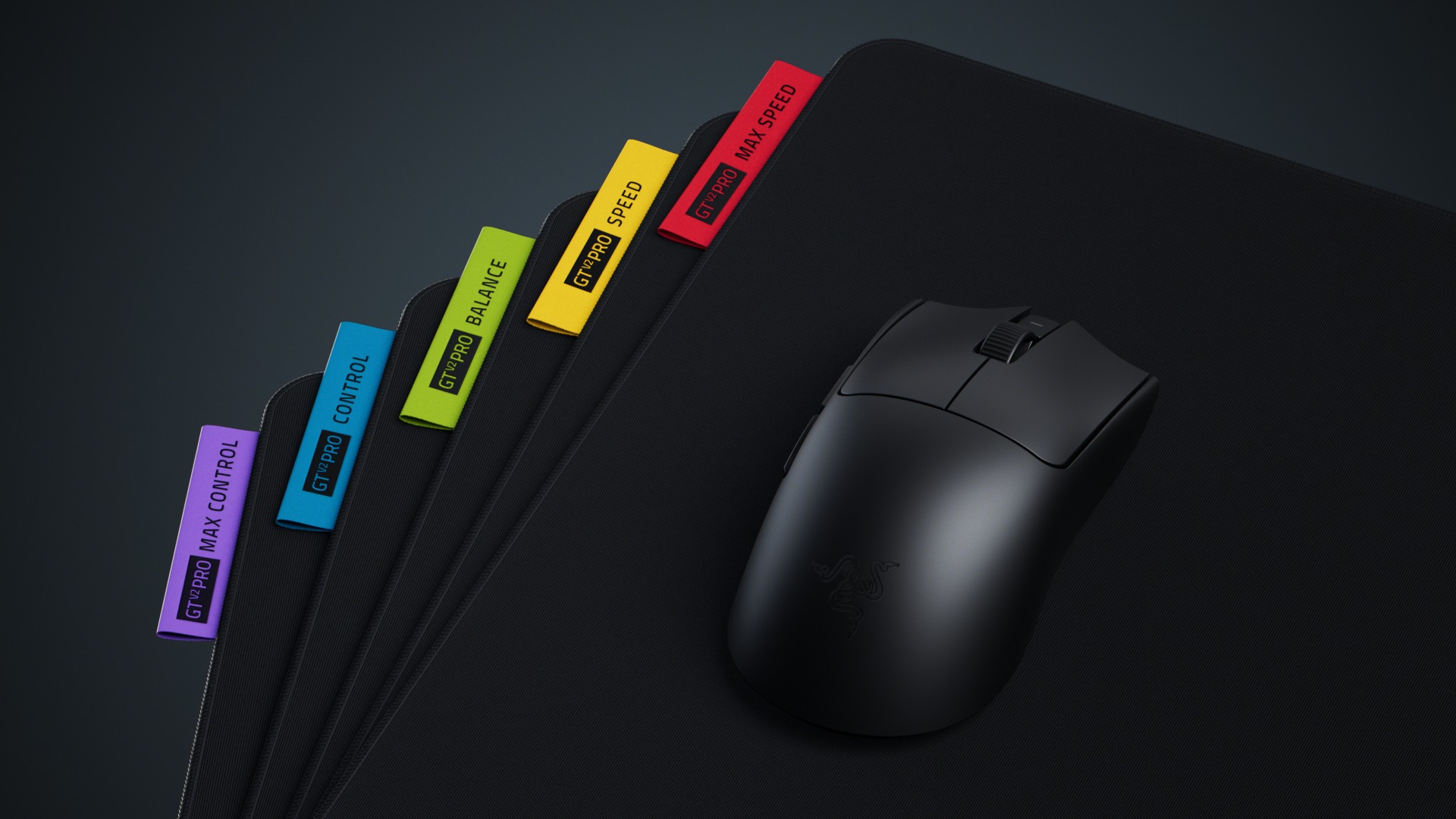
Overall, Razer’s V4 Pro feels extremely light, it’s super responsive, and comfortable to use. Every click, swipe, and scroll feels solid, precise, and reliable. Not to mention, it feels great in your hand. For people with smaller desks, the dongle might take up more room than ideal, but on larger desks or full PC setups, it’s a small tradeoff for stable wireless performance.
At $159.99, it’s a premium mouse at a premium price. But you’re paying for fantastic components and performance. If you’re serious about competitive play, the Viper V4 Pro is one of the best options available right now. Casual gamers might not need every feature, but for anyone chasing precise control, instant responsiveness, and a light feel, this mouse is a no-brainer.
***The mouse and mat were provided to COGconnected for the purpose of this review***
The Good
- Lightweight
- Responsive
- Feels great
- Strong battery life
The Bad
- A tad pricey
- Dongle may not be for everyone
- No RGB lighting