Education has always had the problem of retaining attention. In classrooms, teachers use gestures, whiteboards, and narratives to engage students. On social media, the theater is tiny, noisy, and ruthlessly paced. Scroll down once, and a brand has milliseconds to get attention before the audience scrolls on. That’s where the strength of images comes in. Dry lessons can be rewritten as compelling explainers with colorful pictures, concise narrative, and innovative visual hints.
With Dreamina, the learning brands are moving into this arena using services that demystify the whole process. From idea generation to implementation, it enables teachers and creators to mold content into content that teaches not only but also entertains, surprises, and captivates. Whether science ideas, timeline of history, or even a difficult grammar principle, images well-designed can make them all palatable in seconds. An aggressive beginning could even be designed with an AI photo generator, laying the groundwork for a graphic that will feel rich, deep, and worthy of attention.
Why educational brands need visuals that speak
Text alone can sometimes fall short in the quick-scrolling landscape of Instagram and TikTok. Viewers are trained to anticipate speed, simplicity, and color. Learning brands relying solely on text tend to get lost in the background, while those who innovate using visual-first approaches tend to experience higher retention, improved sharing, and greater recognition.
Consider visuals as the “hooks” of contemporary education. They are not merely pretty—they’re intentional. A well-crafted explainer:
- Generates instant curiosity.
- Dismantles daunting subjects into bite-sized, palatable morsels.
- Invites learners to save or share.
- Places the brand as teacher and creative storyteller in one.
A dry definition regarding volcanoes might go unnoticed, but a carousel post of lava moving across the screen of a phone using arrows and text will grab your attention right away.
Storytelling through design
The edu-graphics magic is in storytelling. Like a teacher creating suspense before a solution is revealed, images can be built up with discovery. Begin with a strong heading, then transition to the second image for a revelation of fact. Employ color and form to approximate the pace of explanation. Rather than put everything in one image, imagine it as pacing a lesson, each frame or image taking the student one step closer.
Even the little things count. Icons, symbols, and labels direct the eye. This is where tools such as an AI logo generator are useful. Study brands can create their own identifiable icons or simplified logos which appear in every post, building consistency within their feed. With time, students start recognizing lessons not only by content, but by looks. That familiarity deepens the connection between instructor and student.
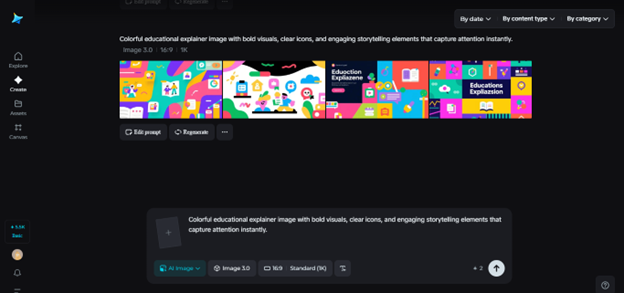
Step 1: Write a text prompt
The adventure starts with imagination. Go to Dreamina and consider what you would like your visual to communicate. For instance, if the topic of the lesson is the water cycle, don’t simply write “water cycle graph.” Rather, be more descriptive and write something such as:
“A multicolored chart of the water cycle illustrating evaporation, condensation, and precipitation, with clouds, arrows, and fun character drawings for children.”
This type of detailed prompt assists Dreamina in knowing your vision more clearly and gives a strong basis for visuals that meet both education and creativity.

Step 2: Refine parameters and create
After getting your prompt ready, proceed to refine. Dreamina provides you with the facility to change model type, aspect ratio, size, and resolution. Clarity is what’s required for educational explainers. Choosing a 1k resolution is good for rapid posts, but 2k will provide that crisp finish for reels and carousels. Once you are comfortable with the settings, just tap on Dreamina’s icon to create the graphic. In no time, you have a refined base image to work on.

Step 3: Customize and download
The finishing touch is refinement. Apply Dreamina’s customizing features such as inpaint, expand, remove, or retouch to refine your design. Perhaps you need to remove clutter, widen the background for captions, or retouch minute details for clarity. When the visual looks good, hit the “Download” icon and save. You now have a ready-to-post explainer that feels new, engaging, and scroll-stopping.

From concept to classroom, reimagined
What edu-graphics are so powerful is that they are versatile. They suit younger audiences who require color and simplification, as well as older students who appreciate simple infographics and crisp diagrams. The secret is learning how to balance substance with imagination. By using tools wisely, learning brands can distill hours of explanation into seconds of interest—without sacrificing depth. Dreamina AI image generator fills this role.
Incorporating personality with micro-visuals
School posts do not require a strict, formal tone. Infusing a bit of playfulness typically makes lessons easier to digest. For example, you could ask a math question, by layering some goofy doodles, or include a little character for a science equation that leads it through the explanation. Stickers and fun graphics promote learning that is fun and memorable.
This is where a sticker maker proves powerful. By creating custom stickers that align with lessons—like speech bubbles, arrows, or quirky characters, educational brands can add subtle humor or charm without overwhelming the content.

Conclusion: lessons that live beyond the classroom
Education no longer stops at schools. Students learn through reels, slideshows, and even memes. For educational brands, the question isn’t if people are eager to learn, it’s how to make learning irresistible within a feed full of distractions.
By turning lessons into edu-graphics, brands have the power to educate with style. They can insert storytelling into diagrams, personality into definitions, and interactivity into concepts. From an initial spark with an AI photo maker, through personal gestures with stickers, to standardizing with logos, the toolkit is open wide. Dreamina ties it all together in a mere three-step process, write, adjust, customize. The payoff is content that not only teaches but delights. When executed well, these visuals don’t merely halt the scroll; they linger in mind, thriving long past the moment of a swipe.