Canadian players don’t stick to one screen anymore. In Video Games Canada’s latest survey, 60% of players reported playing regularly on mobile, 60% on consoles, and 44% on PC. Does that math even work? Yes, those shares add up to well over 100% simply because plenty of people play on more than one type of device. Ubisoft’s The Division Resurgence shows us where that’s heading. It launched on PC with cross-progression, so you can start a session on your phone and pick it up at your desk. You aren’t tethered to one screen, and it works a bit like iCloud keeping your Apple devices in sync.
The world of payments hasn’t kept up the same way, though. You can send an e-Transfer from a PC, but your bank may still ask you to confirm it on your phone. So gaming has gone untethered while payments haven’t, and your phone is often the ball and chain. Buying a game with a card can do it too, when your bank texts you a code before the purchase goes through.
Casino deposits are another place this banking awkwardness shows up. Even within those constraints, a few payment companies are trying to make the process smoother. Loonio is one of the Interac gateways used for iGaming, as PlayStation Universe’s guide to Loonio casinos explains. With its bank-login option, you use your usual banking details, with no card number to enter and no e-Transfer security question to set up. And it handles the payment between the cashier and your bank on mobile or PC.
Five Casino Sites That Accept Loonio in Canada
- Spin Palace: Online since 2001. In the cashier, Loonio is behind the button with the label “Interac e-Transfer Request for Money”.
- Grizzly’s Quest: The newest of the five, launched in May 2025. Its cashier has only one “Interac” button, and that’s Loonio.
- Gaming Club: Online since 1994. Its cashier also has one “Interac” option, and that’s Loonio.
- Spin Galaxy: Online since 2020. Loonio is behind the first “Interac e-Transfer” option in the cashier, labelled as “best choice for Canada”.
- River Belle: Online since 1997. Same label as Spin Palace, “Interac e-Transfer Request for Money”.
All five sites are licensed by the Kahnawà:ke Gaming Commission. They cater to the Rest of Canada (ROC) only and don’t accept players in Ontario or Alberta. In ROC, you need to be 19 to play in most provinces, or 18 in Quebec and Manitoba. Casino games are not skill-based and are games of chance where the house always has an edge. Please gamble responsibly. If you ever need support, ResponsibleGambling.org can help. This article is reader supported.
Note: Loonio is a payment provider, not a casino operator. In this article, “Loonio casinos” means sites that accept its payment service as of the time of writing. Be wary of any site presenting itself as an official “Loonio casino” rather than a casino brand that accepts Loonio. It’s good practice to check the casino operator’s licence against the regulator’s records, too. This guide is not affiliated with Loonio.
Your Phone Holds the Keys to Your Games
Games run on whatever screen you like now, but proving it’s you usually comes back to the phone. Steam is a good example. The Steam Mobile App lets you scan a QR code to sign in to Steam on a PC or in a browser. It holds your Steam Guard codes too. Once the authenticator is set up, you get three ways to confirm a sign-in. So even at your desk, your phone ends up as the key to your library.
That makes sense when you look at modern hardware. When this site tried the MSI Titan 18, it found an Intel Core Ultra 9 and an RTX 5090 inside a laptop. The review called it powerful but not portable, and the writer’s own laptops rarely leave the office anyway. A rig like that stays on the desk, and the phone is the one device you always have on you.
Banks lean on the phone for the same reason. The Canadian Bankers Association found that a banking app is the most common way to bank for 37% of Canadians. Payments Canada counted 1.6 billion Interac e-Transfers in 2025. Many banks build their sign-in checks around the phone. A payment that starts at your desk often ends with a tap on a portable device.
That’s what you run into when you fund an online casino account from a PC. The cashier opens on the big screen, and the bank still tends to want a check on your phone. A Loonio deposit follows the same pattern, so it helps to know what each step looks like.
Inside a Loonio Casino Deposit
Loonio is a payment services provider that moves money between your bank and a merchant. It works with more than 100 Canadian banks and credit unions, and it doesn’t run any of the sites that use it.
You won’t see Loonio’s name at the cashier, at least not at first. At four of these sites it sits behind the first Interac option, labelled as “best choice for Canada”. Grizzly’s Quest has a newer cashier with a single Interac option, and Loonio sits behind that one. Pick the Interac option and enter an amount, and a searchable list of banks and credit unions comes up.
Choose your bank and you’re handed over to its sign-in. You log in the way you normally do, including any two-step check your bank asks for. Then you pick the account to pay from and confirm the pre-authorized debit agreement with one click. The site gets its confirmation right away, and your login is never visible to the merchant or to Loonio.
That’s the main route, and the steps are the same on a phone and a PC. Loonio supports two others, and some cashiers use them instead. One is a regular Interac e-Transfer. You add Loonio as a recipient in your banking app and copy the details from the payment form. The other is Interac Request Money, where a request shows up in your banking and you accept it there. Spin Palace and River Belle label their first option “Request for Money”. Interac says those are typically almost instant but can take up to 30 minutes.
Whichever route you get, you can only spend what’s in your bank account, so there’s no borrowing involved.
Rough Notes From Looking at the Cashiers
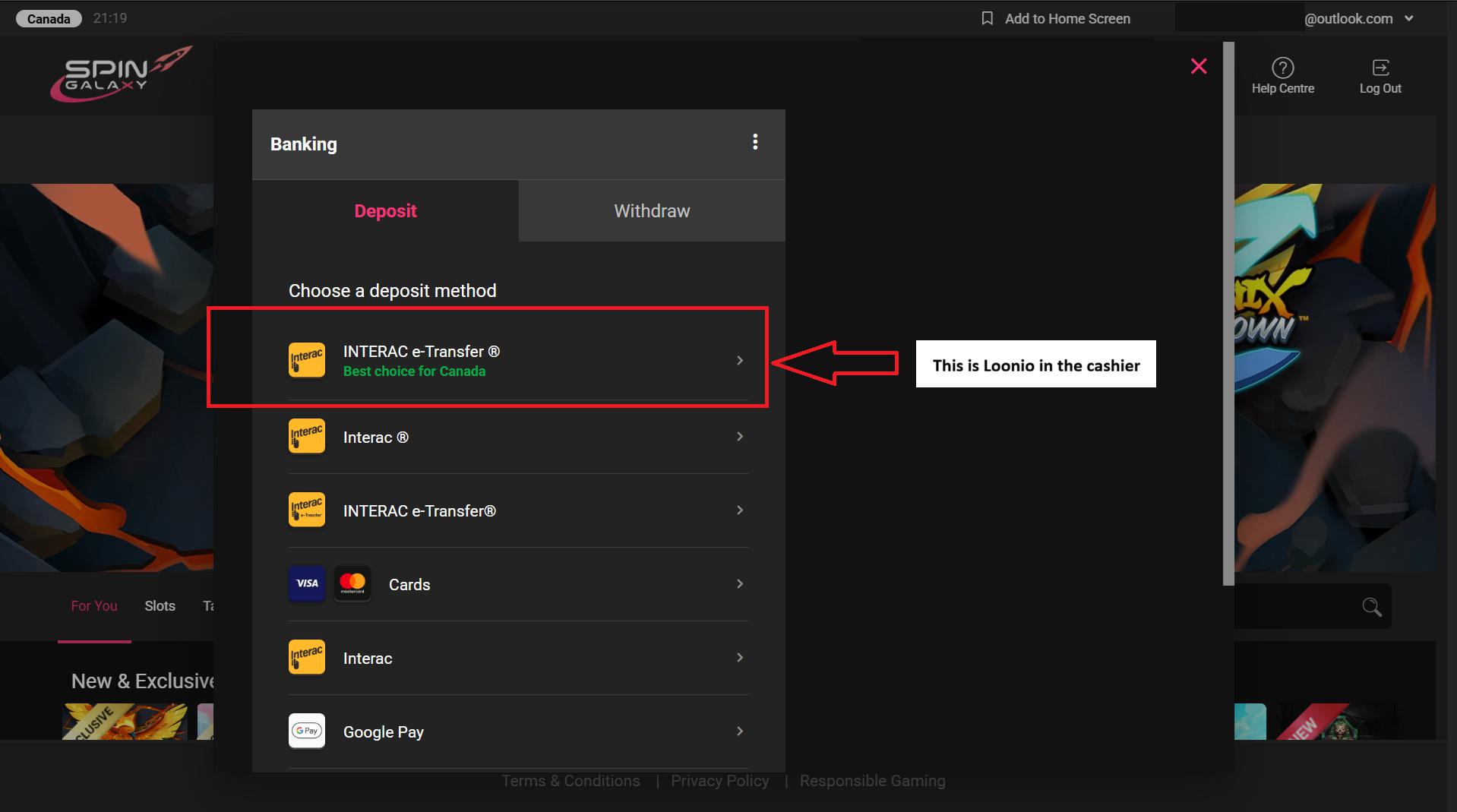
We went through the cashier at all five sites prior to writing this article. The brands’ websites are all different, but four of them share the same cashier template. Spin Galaxy was first. The deposit page opened on Interac e-Transfer with a “best choice for Canada” tag, and Loonio’s name was nowhere on it. Though it had Interac, and the Interac mini-logo. We clicked the tile, typed in an amount, and Loonio became apparent afterwards. Via the UX, and in the bank list that came up under the recipient.
The Spin Galaxy Cashier Has 4 Different Variations of Interact
Spin Palace, Gaming Club and River Belle looked the same, right down to the tag. That’s no surprise with Baytree running all five, but we checked each one anyway. At Spin Palace and River Belle the tagged option reads “Interac e-Transfer Request for Money”. Gaming Club lists just one “Interac” option, with the tag on it. Loonio is usually at the top like cream in a coffee cup. So the iGaming operators have an incentive or reason for players to use it.
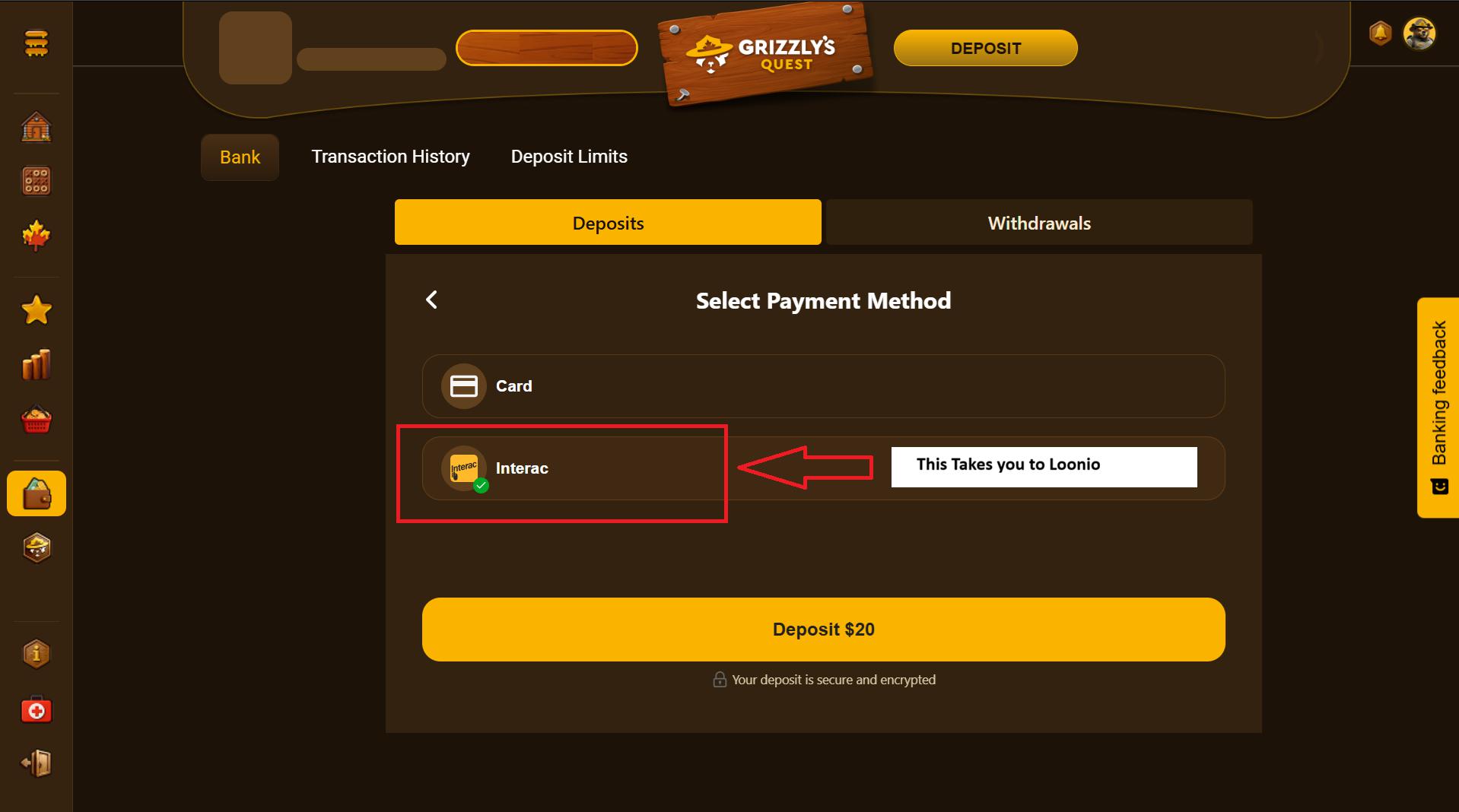
Grizzly’s Quest is the odd one out. It’s the newest of the five, and its cashier has had a revamp. You type in an amount first, then choose between Card and Interac. There’s just one Interac option, with no tag on it.
Grizzly’s Quest New Cashier Only Has One Interac Button
Then we bugged live chat, more than once at two of the sites, with one question. Does Loonio handle deposits and cashouts here? On deposits the answer was yes every time. The Grizzly’s Quest agent confirmed that its one Interac option runs on Loonio. The Spin Galaxy agent confirmed that the “Best Choice for Canada” tagged option is Loonio across the Baytree sites.
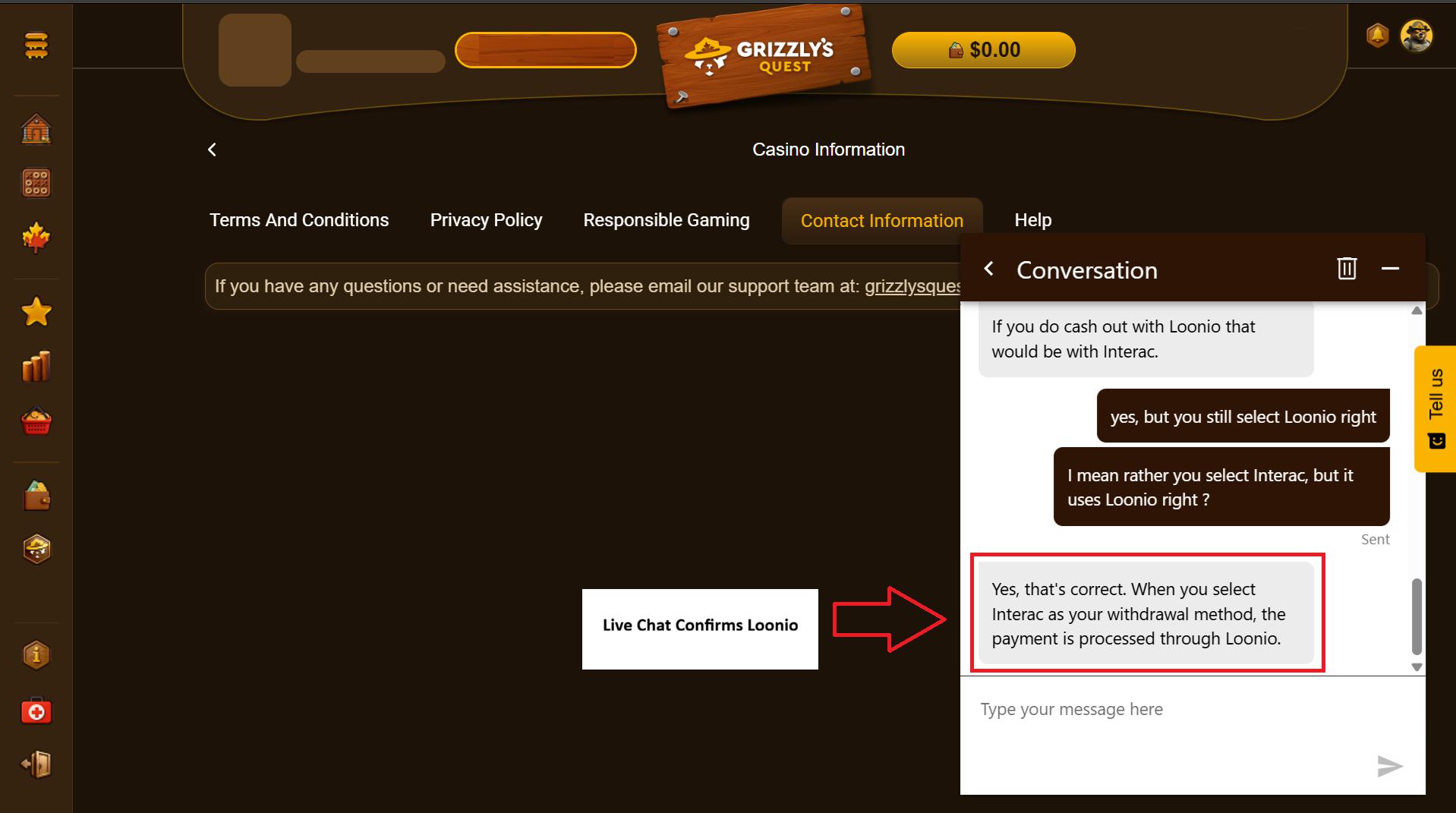
On cashouts the agents said the money goes back by Interac, though not always through Loonio. Though they recommended that players use Loonio when they can. At Grizzly’s Quest, the agent said Interac withdrawals are processed through Loonio, as per the chat below.
Grizzly’s Quest Uses Loonio To Cash Out
Using Loonio for Deposits on a Phone
The cashier at all five sites is a responsive page. It’s the same one you’d see on a PC, just fitted to your screen. The steps don’t change either. You pick the Interac option, enter an amount, choose your bank and sign in.
On a phone, the bank sign-in runs as a redirect in Safari or Chrome. You leave the site’s page for your bank’s, approve the payment and get dropped back in the lobby. With some banks the sign-in hands off to the banking app, where Face ID or a fingerprint gets you in. If your bank sends a two-step code, it arrives on the phone you’re already holding.
The one thing to watch is the trip back. A redirect can occasionally time out your session on mobile, and the site may ask you to log in again. If that happens, check your balance before you try the deposit a second time.
If the cashier gives you e-Transfer details instead, copy them before you switch to your banking app. There’s no Loonio app to install, because everything runs through the browser and your bank.
On PC: Bigger Screen, Phone (Still) Nearby
On a PC the cashier is the same page with more room to work. Choosing your bank opens its sign-in in a separate window, and you land back at the cashier when you’re done. You get a full keyboard for the login, and a password manager can fill in the rest. PC players already juggle sign-ins for Steam and Ubisoft Connect, so one more won’t feel new. If your PC runs Linux, our Linux casino gaming guide covers the browser setup.
The phone still gets pulled in, though. RBC’s two-step verification sends a message to a trusted device such as a smartphone or tablet. You allow or deny the sign-in from there. TD offers its TD Authenticate app or a code by text. So if your bank asks for that second step, you clear it on your phone and carry on at the desk.
Where a cashier sends a Request Money instead, you can accept it in online banking or in your banking app. Either one works.
Spin Galaxy runs through the website with nothing to download, so a PC deposit is just another browser tab. A small first deposit on both devices shows you how your bank behaves. The Durham Post Loonio checklist recommends the same.
When a Loonio Deposit Stalls
The usual snags apply on any device. If reminder emails keep coming but nothing arrives from Interac, check your Spam or Junk folder first. Also, check that Outlook isn’t down (sorry couldn’t help myself). If nothing turns up, the transaction expires after 24 hours and no money leaves your account.
Sometimes an expired transfer still looks like it took money. Some banks place a temporary hold when you start an e-Transfer, and it lifts once the bank sees the transaction failed. If your bank confirms the money did go out, contact Loonio support.
A transfer can also sit as pending while your bank or Interac checks it isn’t fraud. Your bank is the one to call about that. Once a transfer completes, it can’t be reversed. An expired request can’t be resent either, so you start a new one.
Rapid-Fire Questions
Is there a Loonio app? No. The payment runs through the checkout page and your bank’s own channels.
Do you need a Loonio account? No. You pay from your own bank account. There’s nothing to sign up for and no balance to load first.
Does the bank sign-in work on a phone? Yes. It runs in your mobile browser or your bank’s app and brings you back to the site.
Can you start on PC and approve on your phone? Yes, when your bank sends a prompt to a trusted device or the cashier uses Request Money.
Do withdrawals come back through Loonio? Not always. Some sites pay out through a different Interac processor such as eCashout or Gigadat, and ID verification comes before a first withdrawal.
How to Verify the Site, Then the Processor
Start with the name. Loonio is a payment provider and doesn’t run any sites of its own. If a site calls itself “Loonio Casino”, steer clear. Loonio only belongs to the cashier of a licensed site.
Then check the site itself. Match its address against the Kahnawà:ke Gaming Commission’s permit list, since not every address on it works in every jurisdiction. Ontario players can check iGaming Ontario’s list of regulated sites, and Alberta players can check the Alberta iGaming Corporation’s registry. None of the five sites here appears on either list, and they don’t accept players from those provinces. Baytree has a sister company called Cadtree that serves AB and ON, so players there should check which of its brands hold the right licence.
Last, check the processor. FINTRAC’s registry lists Loonio as a registered money services business in Edmonton. The Bank of Canada’s registry lists it as a registered payment service provider. The Bank notes that it doesn’t endorse or license the companies on that list however.
If typing a banking login into a checkout page bugs you, pick e-Transfer or Request Money where the cashier offers them. Both keep the approval inside your bank’s app.
If you’d like to talk to someone, Gambling Support BC answers at 1-888-795-6111 and Quebec’s Gambling: Help and Referral line is 1-800-461-0140. The Responsible Gambling Council, a Canadian non-profit, also publishes prevention resources on its website.
The Bank Decides, Not the Device
As we shared many times throughout this piece, games learned to follow you from device to device a while ago, and banks are still catching up. For a Loonio deposit the screen matters less than you’d think. Your bank decides how the payment gets approved. On mobile that all happens on one device, and on a PC it helps to keep your phone within reach.
Check the permit list first and set a budget you’re comfortable with. If Loonio doesn’t suit your bank, our earlier piece on bank-connected PayDirect casinos covers another route.
Loonio Casinos: The Bottom Line
If you ask us, Loonio is worth using. It suits anyone who already banks online and is tired of typing card numbers at a cashier. Our one gripe is the label. At these five sites, Loonio’s name doesn’t show upfront at the cashier, so you only know you’re using it once the bank list comes up.
Just don’t expect it to remove your bank’s own sign-in check. What the bank-login route skips is the card number and the e-Transfer security question. The check stays, and it often comes to your phone.
We’re fine with that. PC players already made the same deal with Steam Guard. A few seconds on your phone, and nobody else gets into your account. If that’s good enough for a game library, it’s the least we’d want for a bank account.
The Loonio Spec Sheet
Hardware reviews come with a spec sheet, so here’s one for Loonio. Every line comes from a public source such as a registry, a regulator, a bank’s help page or the sites’ own terms. All of it was checked in November 2026.
The company
FINTRAC: Registered as a money services business since December 2021.
Bank of Canada: Registered as a payment service provider since October 7, 2025.
Interac access: Since September 2025, providers holding both registrations can apply to join the e-Transfer network. Loonio holds both.
Outside gaming: Loonio moved into insurance payments in January 2025 through a partnership with SimplePin.
The payment
Balance check: On the bank-login route, Loonio compares your available balance with the amount before it debits. That prevents non-sufficient funds (NSF) charges.
If an e-Transfer goes missing: Interac doesn’t hold or trace funds, so the search starts at your bank.
Fees: Interac doesn’t charge consumers directly, and each bank sets its own. RBC includes e-Transfers on personal chequing accounts. CIBC charges $1.50 unless your account covers them.
Tracing a charge: Loonio’s Payment History page looks up your transactions by email and phone number. Its help form answers within one to two business days.
Your bank’s send limits
On the e-Transfer route, the money leaves from your own banking, so your bank’s send limit applies.
RBC: Up to $10,000 a day in the RBC Mobile app
CIBC: $3,000 per 24 hours, $10,000 per 7 days, $30,000 per 30 days
National Bank: $4,000 per 25-hour period, $14,000 per 7 days
Desjardins: $5,000 per 24 hours
Tangerine: $3,000 a day, $10,000 a week, $20,000 a month
TD and Scotiabank: No published figure. Your own limit shows in your online banking.
Your bank’s second step
The second step is where your phone comes in. RBC and TD are covered in the PC section, and here are five more banks.
Scotiabank: Push notification to your main device, or a code by text or automated call
CIBC: One-time code by text, push notification or voice call, used for sensitive requests
BMO: Code by text, automated voice call or push notification
Desjardins: Six-digit code by text, app notification or phone call
National Bank: Code by text or email
The sites
Withdrawal hold: Baytree runs all five sites, and its terms keep a withdrawal pending for a rolling 24 hours. No withdrawals are processed on weekends. Interac e-Transfer works around the clock, but a request made on a Friday or over the weekend still waits until Monday at the earliest.
Where the money goes: Baytree’s terms pay a withdrawal back by the method you deposited with. Deposit by Interac and the withdrawal comes back by Interac.
Disclaimers:
This overview is supported by referral partnerships. If you decide to use one of the casino brands listed, compensation may be received at no extra cost to you.