TL;DR: If you’re looking for Linux online casinos with a distro compatibility list, or (gasp) a casino download for Ubuntu, you’re stuck in the 2000s. Start with your browser instead. The short answer is that for browser-based play, there is no Windows game client to install or run through Proton. What matters is whether the site supports your browser and accepts players from your province.
Browser choice matters more than distro choice too. Chrome or Brave is the easier pick for live dealer tables. The reason being that both come with the video codecs those streams use. Firefox from your distro’s repositories can also handle standard slots and table games without any extra setup.
The Steam Deck needs a little more explanation, though. Valve’s own library has no place for real-money gambling, so there is nothing to look for in Gaming Mode. The device itself is a native Linux machine, part of the broader handheld PC market. That means it has a built-in desktop for everyday browser use, as Valve explains in its desktop FAQ. That opens up the browser option, where you are free to reach the web on your own terms.
Linux Players in Canada: Where to Start
The Linux responsive iGaming brands below accept Canadians. They are offered under the Kahnawà:ke Gaming Commission license to players in the Rest of Canada only (the scope of this article). You can check the license holder Baytree Interactive Limited in its permit-holder directory.
| # | Site | On Linux |
|---|---|---|
| 1 | Jackpot City | Browser-based lobby built on Games Global titles with Evolution live tables |
| 2 | Spin Casino | Same platform family and the same HTML5-only approach |
| 3 | Ruby Fortune | A lighter lobby, and identical behaviour in Flatpak Firefox or Chrome |
You must be 19 or older, or 18 in Quebec, Manitoba and Alberta, and located in a province where the site is available. Players from Ontario and Alberta provinces should be redirected to their provincial registered sites instead. This article is reader supported.
If play stops being entertainment, the Responsible Gambling Council (ResponsibleGambling.org) and your provincial helpline are the places to start. For Ontario specifically, we recommend ConnexOntario.ca and for Alberta, GameSenseAB.ca with more resources at the end of this article.
Their browser versions are basically what matter for Linux. I mean, you aren’t choosing between three Linux applications, each with its own installation requirements. So since the software is evened out, that makes other areas stand out in importance: browser support, account access and the cashier in particular.
Why There Is No Linux Casino Client, and Why That Is Fine
Search for Linux casinos and much of what comes back feels like going back through time. There are still websites, long since abandoned, telling you to install Wine or keep a Windows virtual machine around. Those pages are remnants of a problem that stopped existing once the lobbies became web apps. What loads today is JavaScript for the interface, WebGL for the reels and tables, and ordinary video streaming for live dealers.
That also settles the hardware question. Mesa’s RADV driver already pushes far heavier workloads on AMD silicon, which is what the Deck, the Steam Machine and most Linux gaming rigs run. If your machine runs God of War Ragnarok, as our PC review found the Deck does, a WebGL lobby is not going to trouble it. Proton never enters the picture either, because there is no Windows binary to translate. The browser is the client, and Linux browsers stopped being a compromise years ago.
About Steam Deck Online Casinos & Browser Access
To be clear, Valve does not carry real-money gambling apps in the Steam Store, and nothing in this article changes that. Everything here happens in a regular web browser, with the Deck used as the Linux PC it already is, in Desktop Mode rather than Gaming Mode. You reach these sites the same way you would on any other computer: through the browser, not through the Steam Store or your library.
How to use the device’s built-in Desktop Mode
Press the Steam button, choose Power, then Switch to Desktop, and you land on a standard KDE Plasma desktop. Valve’s own support page, written for general desktop use, says the Deck “functions like a normal PC” there, and that is exactly how to treat it. Install Firefox or Chrome from the Discover store, which delivers them as Flatpaks that survive SteamOS updates. Then sign in to any site the way you would on a laptop.
Everything above uses stock features. Desktop Mode and the Discover store ship on every Deck, and nothing about the system gets modified. It is the same desktop we had in mind when we called the Deck a real PC as well as a console, used here for the general-purpose browsing Valve documents. The same applies to the Legion Go S and the other handhelds that now run SteamOS, since Valve began licensing SteamOS to third-party handhelds and extended support again with SteamOS 3.8.
A few practical notes. The right trackpad is your mouse and R2 clicks, which is fine for browsing a lobby but fiddly for passwords and forms. Docked with a keyboard and mouse is the comfortable way to do this. The Deck has no camera, so if a site asks for a selfie during identity checks, follow the site’s own instructions for completing that step on a phone.
Linux Gaming in Canada by the Numbers
Statcounter, which works out operating system share from page views across more than a million websites, had Linux at 2.4 percent of Canadian desktop traffic (as of the time of writing on October 22, 2026). Monthly readings swing a lot, so the chart below also shows a six-month average. That average has sat between 3.5 and 4 percent since late 2025, roughly double its low point of 1.9 percent in the first half of 2024.
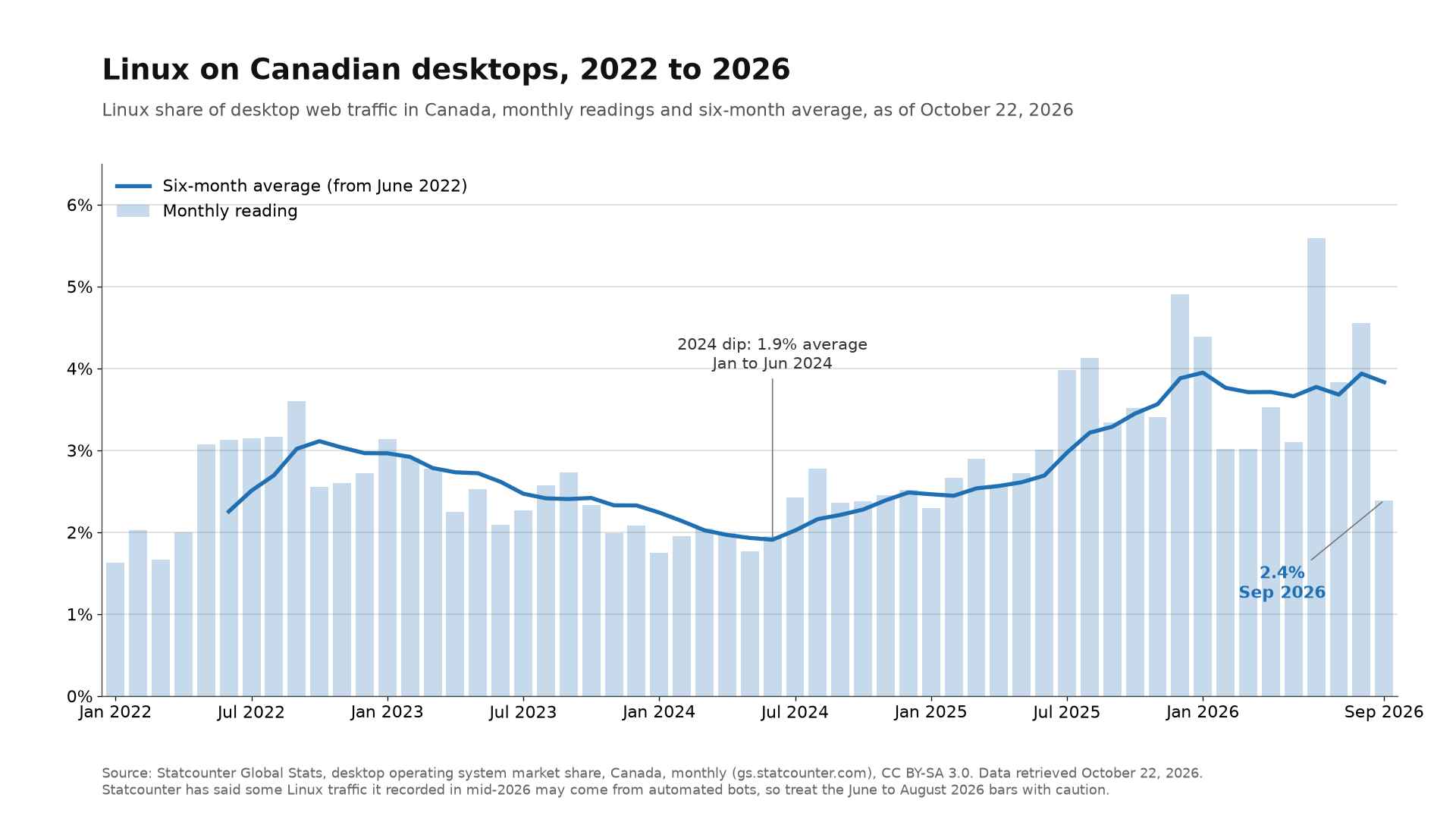
Source: Statcounter Global Stats, CC BY-SA 3.0.
Canada trails the world basically. Worldwide, Linux stood at 4.5 percent of desktop traffic in the same month, again as of October 22, 2026. One reason is that Canada is unusually Mac-heavy. Apple systems account for close to 30 percent of Canadian desktop traffic against about 17 percent globally, which leaves less room for everything else.
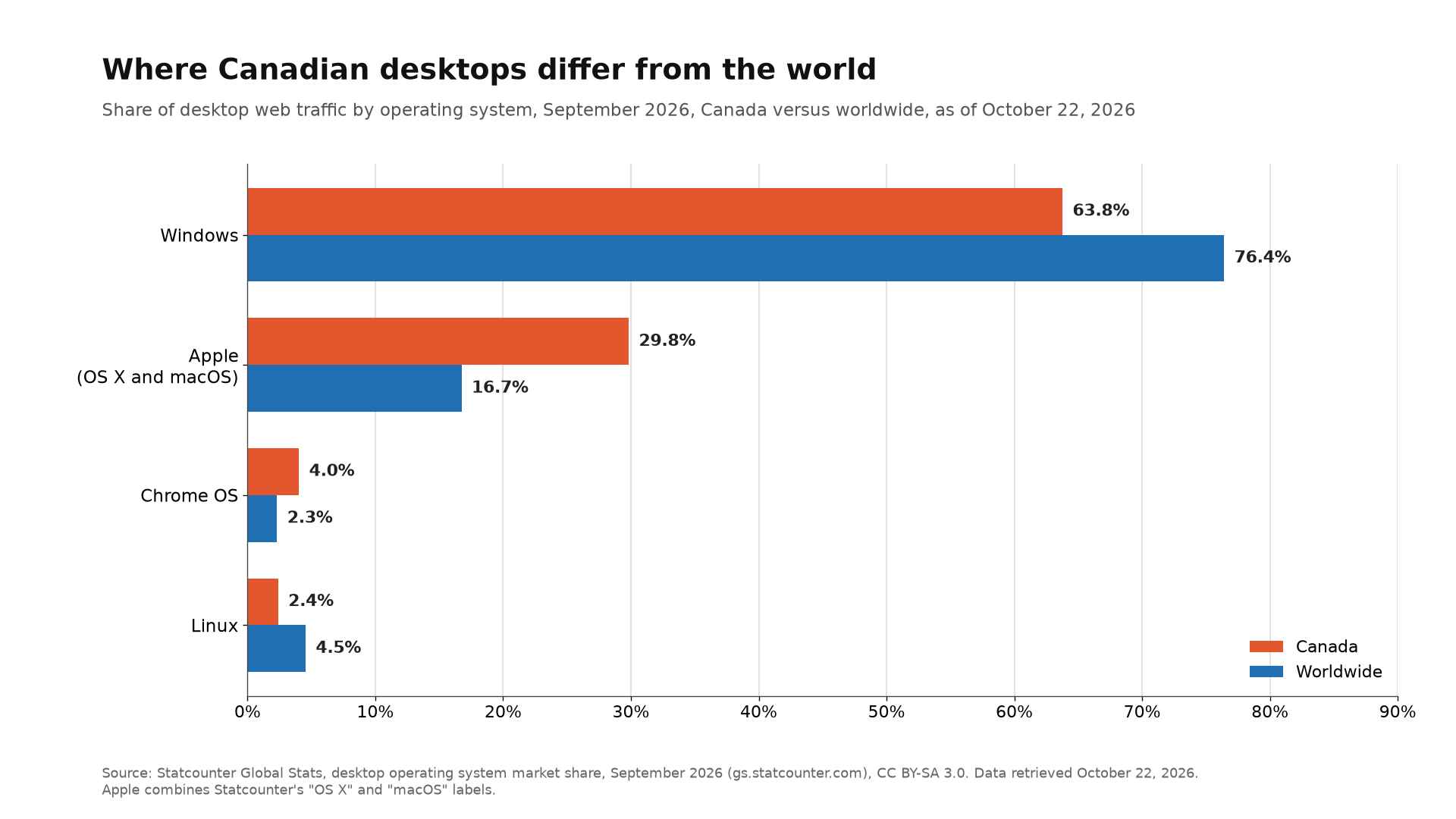
Source: Statcounter Global Stats, desktop operating system share for Canada and worldwide, CC BY-SA 3.0.
Small as that sounds, a few percent of every desktop in the country is a lot of people, and the share has been climbing for two years.
Distro by Distro: What to Expect
Which distro you run matters less than whether you are on a handheld or at a desk. The site is the same website everywhere, so the differences come down to where the browser comes from and how well video plays.
- SteamOS (Steam Deck, Steam Machine, Legion Go S): install Firefox or Chrome from Discover, which delivers them as Flatpaks. This is Desktop Mode only. On the Deck’s 1280×800 screen, expect some lobbies to serve their tablet layout rather than the desktop one.
- Bazzite: same Flatpak browsers from the built-in software centre. The base system is immutable, meaning read-only, so adding a browser cannot break anything underneath it.
- CachyOS and Arch: install the browser from the repositories or as a Flatpak. These are rolling releases that update constantly, and keeping the browser current is what keeps video codecs working.
- Linux Mint and Ubuntu: install from the repositories, as a Flatpak, or as a Snap on Ubuntu. These are conventional desktops and the closest thing to the Windows experience.
Hardware video decoding is the one thing worth checking. Live tables are a continuous video stream, and if the browser cannot hand decoding to the graphics chip, the CPU does the work and the battery pays for it. On AMD systems with current Mesa drivers this is rarely a problem. On Nvidia desktops, where browser video acceleration on Linux has historically been less reliable, open a live table for five minutes and watch the fan before you commit to a session.
Verification, Payments and the Things a Handheld Cannot Do
Before depositing anywhere, check the operator. The Kahnawà:ke Gaming Commission publishes its permit-holder list, and the three .com domains above sit under Baytree Interactive Limited. Ontario and Alberta players can confirm the Cadtree versions on iGaming Ontario’s market page and the Alberta iGaming Corporation’s registered-sites directory. Each site’s footer names the company and the regulator, and if those do not match the registers, you are on the wrong site.
Every licensed site has to verify your identity before you can withdraw, and that is the first real hurdle on Linux, although it is paperwork rather than a technical problem. Uploading a photo of your ID or a proof-of-address document is an ordinary file upload from the Deck’s file manager, the same as on any PC. If the operator also asks for a selfie to match against your ID, the Deck has no camera, so you finish that step on your phone through the site’s own process.
Payments are easier than people expect. Interac e-Transfer runs through your bank’s app or website, not the casino’s. Card payments redirect you to your bank’s verification page and back again. It doesn’t matter what operating system you are on. Apple Pay and Google Pay are built around phones, so whether they appear in a cashier on a Linux desktop browser varies from site to site.
The handheld’s remaining limits are physical. The screen is small for a desktop lobby, controller buttons mean nothing to a web page, and streaming live video for an evening costs more battery than most of what you play on the device.
Bottom Line
You probably already have the setup you need. Start with your usual browser and check the operator’s requirements before registering. There’s little reason to change distributions for one website, especially if you’re happy with the rest of your Linux setup.
On a Steam Deck, use the built-in Desktop Mode and see how comfortable the site is to navigate. A keyboard makes account forms less of a chore, but you might simply prefer doing that part at your desk. Owners of Windows handhelds like the ROG Xbox Ally X have the same practical choice.
Responsible Gaming on Linux
Casino games are not games of skill. If it stops feeling like something you chose, the services below cost nothing, stay confidential and are open to anyone in Canada.
- Ontario: ConnexOntario on 1-866-531-2600, 24 hours a day. ResponsibleGambling.org has self-check tools.
- Alberta: GameSense at gamesenseab.ca, or ab.211.ca for services near you.
- Quebec: Jeu: aide et référence on 1-800-461-0140.
- British Columbia: Gambling Support BC on 1-888-795-6111, free, 24 hours a day.
- Everywhere else: your provincial lottery corporation’s site lists the local problem gambling line.
The age rule from the top of this article applies here too: 19, or 18 in Quebec, Manitoba and Alberta.